
The resolution comes after Microsoft acknowledged a widespread incompatibility impacting specific Dell systems, which manifested as instability and operational failures for users. The core of the problem stemmed from a conflict between a newly introduced Windows USB-C Connection Manager interface and the Intel Innovation Platform Framework (IPF) Processor Participant driver, a crucial system-level hardware component responsible for managing processor power and thermal performance. This intricate interaction led to a cascade of issues, ultimately necessitating an out-of-band fix from the software giant.
The Genesis of the Glitch: A Technical Deep Dive
The technical conflict that underpinned these issues was first introduced with the June 23, 2026, KB5095093 preview cumulative update for Windows 11. While preview updates are designed to test new features and gather feedback before wider release, this particular update contained a modification to the Windows USB-C Connection Manager interface. This new interface, intended to enhance the functionality and stability of USB-C connectivity across Windows devices, inadvertently clashed with the existing Intel Innovation Platform Framework (IPF) Processor Participant driver.
The Intel IPF Processor Participant driver is not merely a peripheral component; it is a fundamental part of the system’s architecture, deeply integrated into how a computer manages its power states, thermal regulation, and overall performance. It acts as a liaison between the operating system and the processor’s various power-saving and performance-boosting features. When the new Windows USB-C Connection Manager interface attempted to interact with system resources, it encountered an unexpected response from the Intel driver, leading to an incompatibility.
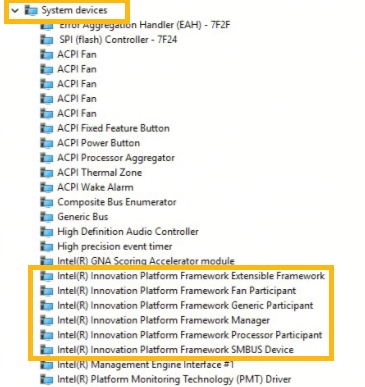
This incompatibility was not immediately apparent to all users or systems. However, on a limited number of Dell devices, the conflict caused the operating system to incorrectly interpret the state or capabilities of the Intel driver. The most visible symptom for affected users was a yellow exclamation mark displayed next to the "Intel Innovation Platform Framework Processor Participant driver" entry within the Device Manager, signaling a driver error or conflict. Beneath this diagnostic warning lay the more severe operational consequences: erratic performance, increased heat generation, rapid battery drain, and, most critically, sudden and uncommanded system shutdowns.
Microsoft’s statement confirmed the specifics, noting: "After installing the June 23, 2026, Windows preview update (KB5095093), a limited number of Dell devices might display a yellow exclamation point in Device Manager next to the Intel Innovation Platform Framework Processor Participant driver. These devices can potentially experience unexpected shutdowns, poor performance, increased heat, and battery drain. This issue was reported by Dell during testing and identified as an incompatibility between the Intel driver and the new Windows USB-C Connection Manager interface introduced in the June 23, 2026, Windows preview update (KB5095093)." This detailed explanation underscored the specific interaction points of the conflict, highlighting the complexity of modern hardware-software integration.
A Chronology of the Event and Microsoft’s Response
The timeline of this incident reflects a rapid identification and response effort by Microsoft, often in collaboration with its hardware partners.
- June 23, 2026: Microsoft releases the KB5095093 preview cumulative update. This update, while not mandatory, contains the foundational change to the Windows USB-C Connection Manager interface that would later trigger the compatibility issue. Dell, through its rigorous internal testing protocols, identifies the emerging conflict on some of its systems and promptly communicates its findings to Microsoft. This proactive engagement from a hardware partner proved instrumental in early detection.
- Early July 2026 (Leading up to Patch Tuesday): As the July 2026 Patch Tuesday approaches, Microsoft prepares the KB5101650 cumulative security update for Windows 11 25H2 and 24H2. This security update, when installed on Dell systems already affected by the June preview update’s underlying change, exacerbates or fully triggers the performance and stability issues.
- Tuesday, July [Date inferred from context], 2026: Microsoft officially acknowledges the issue publicly. Recognizing the critical nature of unexpected shutdowns and performance degradation, the company takes immediate action to prevent further spread. Microsoft implements a safeguard, blocking the distribution of the July 2026 security update (KB5101650) to specifically identified affected Dell systems. This measure was crucial in containing the problem, preventing more users from encountering the instability.
- Saturday, July [Date inferred from context], 2026: Just three days after acknowledging the problem and implementing the block, Microsoft releases emergency out-of-band (OOB) updates. These critical patches are made available for affected Dell PCs running Windows 11 25H2 and 24H2 (KB5121767), as well as those on Windows 11 Enterprise LTSC 2024 (KB5121768). The rapid deployment of these OOB updates underscores the severity of the issue and Microsoft’s commitment to swiftly resolving critical bugs that impact user experience and system stability.
Affected Systems and Scope of Impact
The issue was specifically observed on "a limited number of Dell devices." While the exact number of affected machines was not publicly disclosed, Dell’s position as one of the world’s leading PC manufacturers, with a significant global market share (often ranking among the top three alongside Lenovo and HP), implies that even a "limited" percentage could translate to thousands, if not tens of thousands, of devices. The problem was confined to systems running Windows 11, specifically versions 25H2 and 24H2, as well as the Enterprise LTSC 2024 variant, indicating a focus on newer Windows 11 builds.
The specificity to Dell systems, despite the underlying driver being from Intel and the OS component from Microsoft, suggests a unique confluence of hardware configurations, driver versions, or system firmware implementations prevalent in certain Dell models that made them particularly susceptible to this incompatibility. This highlights the intricate web of dependencies in modern computing, where the interaction between hardware, firmware, drivers, and the operating system can lead to unforeseen issues.
For users, the impact was significant. Unexpected shutdowns can lead to data loss, corrupted files, and disrupted workflows. Poor performance and increased heat not only degrade the user experience but can also raise concerns about long-term hardware reliability. Battery drain, while less critical, directly impacts the portability and utility of laptop devices. These issues collectively presented a substantial inconvenience and potential risk for the affected user base.
Official Responses and Collaborative Efforts
The resolution of such complex issues typically involves a collaborative effort between multiple technology giants.
Microsoft’s Stance:
Microsoft’s official statements accompanying the emergency updates were clear and concise. For KB5121767, the company stated, "This update addresses an issue affecting a limited number of devices with an Intel Innovation Platform Framework (Intel IPF) driver that could cause changes in performance, power consumption, or system behavior after installing recent Windows updates." They further clarified the target audience: "A limited number of Dell devices that were temporarily prevented from receiving the July 2026 security update KB5101650 can now install this OOB update. This OOB update is only recommended for devices affected by this issue. If your device is not affected, no action is required." This guidance ensured that only systems genuinely experiencing the problem would receive the specialized fix, avoiding unnecessary updates for unaffected machines.

For enterprise environments, Microsoft also provided specific guidance. Devices managed by Windows Autopatch with hotpatch updates enabled were slated to receive this emergency update automatically, streamlining deployment for IT departments. Furthermore, IT administrators leveraging Microsoft Intune were directed to documentation on expediting updates, empowering them to quickly roll out the fix across their organizational fleets. This multi-pronged approach demonstrates Microsoft’s consideration for both individual users and large-scale deployments.
Dell’s Role:
Dell’s early detection of the issue during its testing phase was a critical factor in the swift response. While no direct public statement from Dell was included in the original report regarding the fix, their proactive identification of the problem "during testing" and subsequent reporting to Microsoft showcases a robust quality assurance process and a commitment to customer experience. It is reasonable to infer that Dell collaborated closely with both Microsoft and Intel throughout the diagnostic and resolution phases, providing essential telemetry and system-specific insights. Their early alert likely accelerated the diagnosis and the development of the emergency patches, mitigating what could have been a much larger and more prolonged disruption.
Intel’s Implied Involvement:
As the manufacturer of the affected Intel Innovation Platform Framework (IPF) Processor Participant driver, Intel’s engineering teams would undoubtedly have been involved in understanding the conflict. While not explicitly mentioned in the provided text as issuing a statement, it is highly probable that Intel collaborated with Microsoft and Dell to analyze the driver’s interaction with the new Windows USB-C Connection Manager interface. Such collaborations are standard practice in the tech industry when complex hardware-software incompatibilities arise, ensuring that future driver updates or operating system changes can prevent similar conflicts.
Broader Implications and Industry Context
This incident, though swiftly resolved, highlights several broader implications for the tech industry, users, and IT professionals.
The Perils of Complexity:
Modern computing systems are incredibly complex ecosystems where operating systems, hardware components, drivers, and firmware must all interact seamlessly. Even minor changes in one layer can ripple through the entire stack, leading to unforeseen incompatibilities. The clash between a new USB-C interface and a core power management driver underscores this inherent complexity. It’s a constant balancing act between innovation (new features, improved security) and maintaining compatibility across a vast array of hardware configurations.
The Importance of Preview Programs and Partner Testing:
The fact that Dell identified the issue during its testing of a preview update (KB5095093) demonstrates the critical value of early access programs and robust partner testing. These programs allow manufacturers to proactively identify potential conflicts before updates are broadly released, providing invaluable feedback to OS developers. Without Dell’s vigilance, the July security update could have caused far more widespread disruption before the root cause was even fully understood.
Windows Update Reliability and Trust:
Incidents like this, while ultimately resolved, can chip away at user trust in the reliability of Windows Updates. Historically, Windows updates have occasionally been associated with unexpected issues, ranging from minor glitches to more severe system instability. Microsoft has invested heavily in improving its update mechanisms, including phased rollouts, AI-driven targeting, and enhanced diagnostic tools. The rapid turnaround for this Dell-specific fix demonstrates an improved capability to respond to critical issues, which is vital for maintaining user confidence in the security and stability of their operating systems.
Impact on IT Administration:
For IT administrators managing fleets of Dell PCs, such issues present immediate challenges. Even with expedited deployment options via tools like Windows Autopatch and Intune, identifying affected machines, planning deployment, and potentially troubleshooting individual user issues add to their workload. The need to stay informed about potential update-related problems and to have contingency plans in place is a constant demand in enterprise IT. The "out-of-band" nature of these fixes also means they bypass the regular Patch Tuesday schedule, requiring additional attention and deployment cycles.
Security vs. Stability:
Security updates are non-negotiable in the current threat landscape, where new vulnerabilities emerge daily. Delaying or blocking security updates, even temporarily, introduces a window of exposure to potential cyberattacks. Microsoft’s decision to block the July security update for affected Dell systems was a pragmatic choice to prioritize system stability over immediate security patching for a limited subset of users. However, it underscores the tension between ensuring system stability and maintaining a robust security posture, a challenge that operating system developers continually navigate.
Future Outlook:
Moving forward, this incident will likely reinforce the need for even tighter collaboration between operating system developers (Microsoft), hardware manufacturers (Dell), and component suppliers (Intel). Enhanced testing protocols, earlier sharing of development roadmaps, and more sophisticated compatibility testing matrices will be crucial. The increasing prevalence of USB-C and its evolving capabilities, especially concerning power delivery and alternate modes, suggests that the USB-C Connection Manager interface will continue to be a critical component, requiring careful integration with underlying hardware drivers.
In conclusion, Microsoft’s swift action to release emergency updates for Dell PCs affected by the July 2026 Windows 11 security update demonstrates a robust incident response capability. While the incompatibility between the new USB-C Connection Manager interface and the Intel IPF Processor Participant driver caused significant disruption for a subset of users, the rapid diagnosis, containment, and resolution highlight the continuous efforts by major tech players to ensure system stability and user satisfaction in an increasingly complex digital world. Users who have not yet installed the July 2026 security update and are now installing the emergency fix will be required to restart their devices to ensure the changes take effect, bringing their systems back to optimal performance and stability.

