
As the integration of Large Language Models (LLMs) moves from browser-based interfaces into local development environments, developers are increasingly encountering a new artifact in their project directories: the .claude folder. This hidden directory, typically generated by command-line interface (CLI) tools, agent frameworks, or integrated development environment (IDE) extensions powered by Anthropic’s Claude models, represents a significant shift in how artificial intelligence interacts with local codebases. Far from being a mere temporary cache, the .claude folder serves as the operational nerve center for agentic workflows, acting as a bridge between the stateless nature of cloud-based LLMs and the stateful requirements of complex software engineering tasks.
The emergence of this folder coincides with the rapid adoption of "Agentic AI"—systems capable of planning, executing, and refining multi-step tasks autonomously. For these agents to function effectively within a local project, they require a persistent memory of previous actions, configuration settings, and context that the API itself does not inherently store. Understanding the architecture, purpose, and management of the .claude folder is now a requisite skill for developers looking to optimize their use of AI-driven development tools while maintaining project hygiene and security.
The Technical Rationale for Local State Persistence
At the heart of the .claude folder’s existence is the fundamental limitation of Large Language Models: statelessness. Every time a request is sent to an LLM like Claude 3.5 Sonnet, the model processes that request in isolation unless a history of the conversation is explicitly provided. In a web chat interface, the platform manages this history on its servers. However, when using Claude as a local development tool—where it might be tasked with refactoring a specific module, debugging a test suite, or generating documentation—the model needs a localized "working memory" to ensure consistency across multiple execution runs.
The .claude folder functions similarly to the .git directory for version control or the .vscode folder for editor settings. It provides a standardized location for tools to store metadata that does not belong in the source code itself but is essential for the tool’s operation. By localizing this data, developers can ensure that the AI "remembers" the specific constraints of a project, the progress of a multi-hour coding task, and the specific preferences defined by the user.
Anatomy of the .claude Directory: A Technical Breakdown
While the exact contents of a .claude folder can vary depending on the specific tool or framework in use, most implementations follow a structured pattern designed for rapid read/write access. The folder is prefixed with a dot, a standard Unix-like convention for hiding configuration files from the default directory view, emphasizing its role as a background system resource.
Configuration and Environment Settings
The config.json file is perhaps the most critical component. This file defines the operational parameters for the Claude integration within that specific project. It may contain instructions on which model version to use (e.g., Claude 3 Opus vs. Claude 3.5 Sonnet), token limits for individual sessions, and "system prompts" that define the AI’s persona and rules of engagement. By storing these locally, the tool ensures that every developer working on the project—or every subsequent run by the same developer—adheres to the same logical framework.
Context and Working Memory
The memory/ or context/ subdirectories act as the long-term storage for the agent. In these folders, the system stores snippets of relevant code, summaries of previous interactions, and documentation that the model has "read" and might need to reference again. This is particularly important for managing "context window" efficiency. Rather than sending the entire codebase to the API with every query—which would be prohibitively expensive and slow—the system uses the local memory folder to perform RAG (Retrieval-Augmented Generation), sending only the most relevant pieces of information.
Agent Definitions and Task Workflows
In more advanced agentic frameworks, an agents/ folder may exist within the .claude directory. This contains structured definitions for specific sub-agents. For example, a project might have a "Testing Agent" defined by a specific set of prompts and a "Security Auditor Agent" defined by another. These files allow the system to switch between specialized roles without requiring the user to re-input complex instructions.
Execution Logs and Telemetry
The logs/ directory provides a historical record of every interaction between the local tool and the Claude API. These logs are indispensable for debugging when an AI agent produces unexpected results or fails to complete a task. They capture the raw prompts sent to the model and the structured responses received, allowing developers to audit the AI’s decision-making process.
Performance Optimization through Caching
The cache/ folder is used to store intermediate results and expensive computations. If the AI has already analyzed a large library or performed a complex calculation, the results are stored here to speed up future interactions. This reduces latency and minimizes the number of API calls, leading to a more responsive developer experience.
The Operational Lifecycle: How the Folder Functions
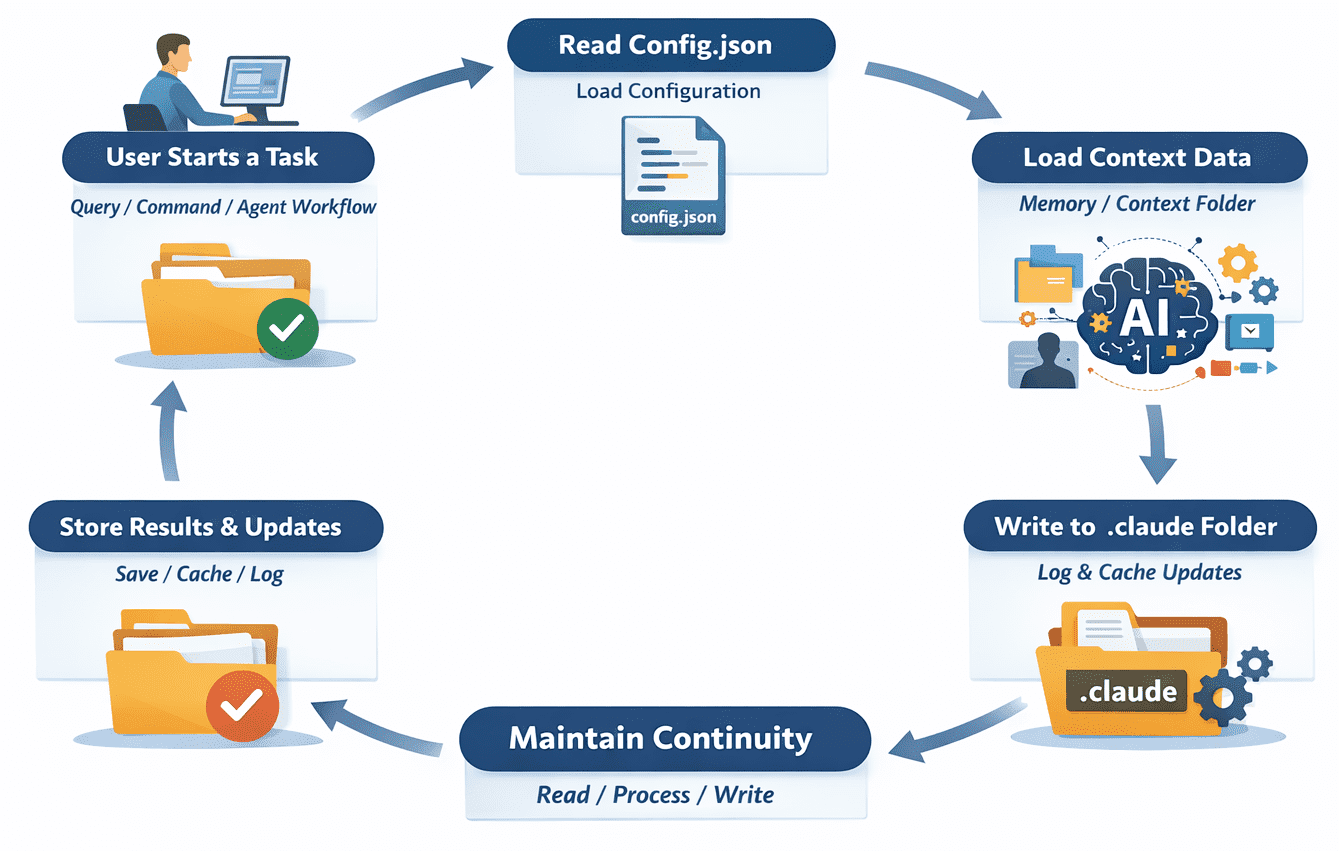
The lifecycle of the .claude folder begins the moment a Claude-powered command is executed within a project directory. The process typically follows a predictable chronology:
- Initialization: The tool checks for the existence of the
.claudefolder. If absent, it creates the directory structure and populates it with default configuration files. - Context Loading: Before sending a request to the Anthropic API, the tool reads from
config.jsonand thememory/folder. It gathers the necessary context to make the prompt as accurate as possible. - Task Execution: The AI performs the requested work. If it is a multi-step process, the tool may write intermediate "checkpoints" to the folder to ensure that progress is not lost if the process is interrupted.
- State Update: Once the task is complete, the tool updates the logs, refreshes the cache, and potentially updates the memory files with new information learned during the session.
- Persistence: The folder remains in the directory, ready to provide continuity for the next command, whether it occurs seconds or days later.
Data Efficiency and Cost Implications
One of the primary benefits of the .claude folder is its impact on cost management. API usage is billed based on "tokens"—units of text processed by the model. Without the local state management provided by the .claude folder, developers would often find themselves repeating context in every prompt to ensure the model has enough information to act correctly.
By utilizing local caching and structured memory, these tools can reduce the "input token" count significantly. Supporting data suggests that efficient context management via local state can reduce API costs by 30% to 50% in large-scale projects by preventing the redundant transmission of static codebase information. Furthermore, by storing "embeddings" (mathematical representations of text) locally, the system can perform local searches to find relevant code before ever contacting the cloud, further optimizing performance.
Security Protocols and Management Best Practices
The convenience of the .claude folder brings with it several security and project management challenges. Because the folder can contain sensitive information—including snippets of proprietary code, internal documentation, and occasionally API-related metadata—proper handling is essential.
The .gitignore Mandate
The most critical best practice is to add .claude/ to the project’s .gitignore file. In almost all scenarios, this folder represents local state that is specific to an individual developer’s machine and session. Committing this folder to a shared repository like GitHub can lead to "repository bloat" and, more seriously, the accidental exposure of sensitive telemetry or private configuration.
Data Privacy and Log Management
Developers must be aware that the logs/ directory within .claude may contain plain-text records of sensitive data processed during an AI session. In corporate environments with strict data privacy requirements, it is recommended to periodically purge these logs or use tools that support encrypted local storage.
Resetting the AI State
When an AI agent becomes "confused" or begins producing hallucinated results, it is often due to corrupted or outdated context stored within the .claude folder. In such cases, deleting the folder is a safe and effective troubleshooting step. Upon the next command execution, the tool will recreate the folder with a clean state, effectively "rebooting" the AI’s local memory.
Broader Impact on the Software Development Life Cycle (SDLC)
The normalization of the .claude folder signals a broader evolution in the SDLC. We are moving toward a future where "Project State" includes not just the source code and the git history, but also the "AI Context State."
Industry analysts suggest that as these tools mature, the way we share project context among teams may change. While the .claude folder itself should remain local, the definitions of the agents and the structured prompts it contains might eventually be version-controlled in a sanitized format. This would allow teams to share "AI coding standards" as easily as they currently share linting rules or formatting configurations.
Furthermore, the existence of this folder highlights the increasing importance of local-first AI. By keeping the working state on the developer’s machine rather than in a centralized cloud database, developers maintain a higher degree of sovereignty over their data and their workflow. It represents a middle ground between the total privacy of local LLMs (which may lack the reasoning power of Claude) and the convenience of cloud-based AI.
Conclusion
The .claude folder is more than a byproduct of modern AI tooling; it is a foundational component of the next generation of software development. By providing a dedicated space for configuration, memory, and logs, it enables Claude to function as a sophisticated, context-aware collaborator rather than a simple text generator.
As developers continue to integrate AI more deeply into their daily routines, the ability to inspect, manage, and secure the .claude directory will become as routine as managing a .env file or a node_modules folder. Embracing this local state management is the key to unlocking the full potential of agentic AI, ensuring that every interaction with the model is faster, smarter, and more aligned with the specific needs of the project at hand. In the rapidly changing landscape of artificial intelligence, the .claude folder stands as a testament to the need for persistence in an increasingly automated world.
