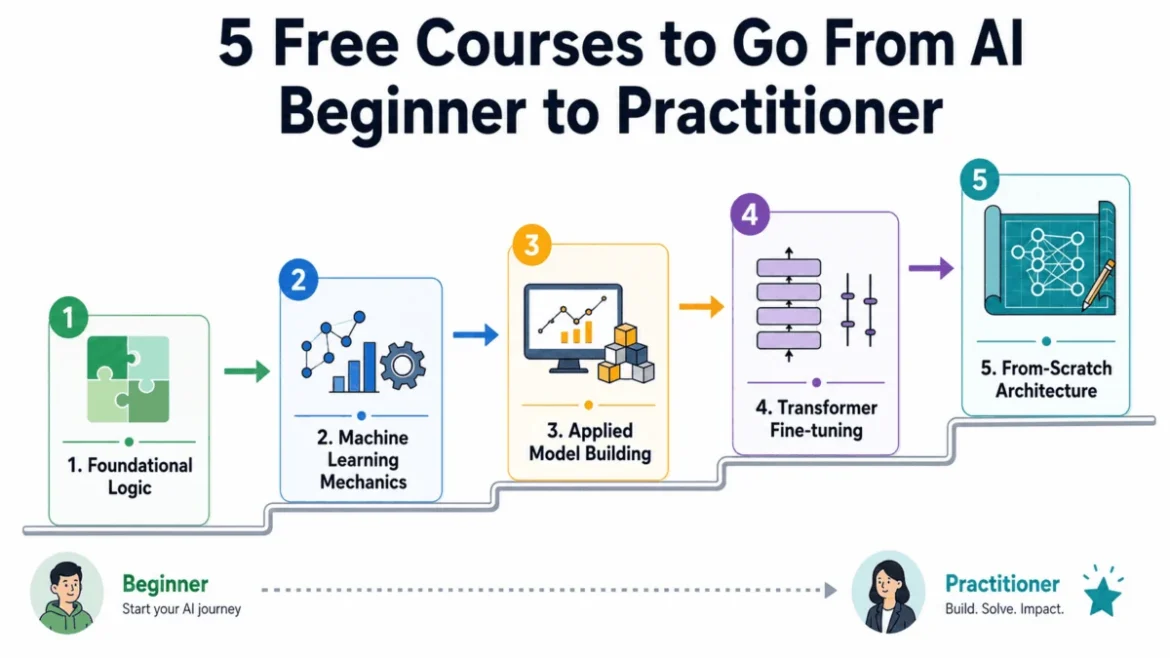
The global landscape of technical education is undergoing a seismic shift as the democratization of artificial intelligence knowledge outpaces traditional academic structures. As of 2026, the barrier to entry for high-level AI engineering has reached an all-time low in terms of cost, yet the complexity of navigating available resources has reached an all-time high. The proliferation of high-priced "AI bootcamps" and "accelerated certifications" has created a saturated market where the signal-to-noise ratio often obscures the most effective learning paths. Industry experts and lead developers at frontier AI labs increasingly signal that the most robust educational materials are not found behind paywalls, but are instead those open-sourced by the very organizations and individuals driving the current technological revolution. For professionals with a foundational grasp of Python, a strategic, five-course sequential roadmap has emerged as the gold standard for transitioning into a practitioner role without the financial burden of a formal degree.
The Shift Toward Skills-Based AI Hiring
The demand for AI proficiency has moved beyond the research laboratory and into the core of enterprise operations. According to recent labor market analyses, job postings requiring AI skills have grown at a rate 3.5 times faster than all other occupations. However, a significant "skills gap" persists. Traditional four-year degrees often struggle to keep pace with the bi-weekly release cycles of new large language models (LLMs) and optimization techniques. In response, hiring managers at major tech firms have shifted their focus toward "proof of work"—github repositories, deployed models, and a deep first-principles understanding of architecture—rather than institutional credentials. This environment has paved the way for a curriculum that prioritizes practical application and fundamental theory over academic abstraction.
Phase I: Establishing the Logic of Intelligent Systems
The journey from a software engineer to an AI practitioner begins with a fundamental shift in how one approaches problem-solving. While traditional programming relies on explicit instructions, AI relies on probabilistic reasoning and search algorithms. The foundational phase of this roadmap is anchored by Harvard University’s CS50: Introduction to Artificial Intelligence with Python.
Harvard’s curriculum is designed to bridge the gap between standard software development and machine learning. It focuses on the "why" behind AI decision-making, covering search algorithms, classification, optimization, and reinforcement learning. By using Python to implement these concepts, students develop a mental model of how an agent navigates a state space to reach a goal. This phase is critical because it addresses the "black box" problem; many self-taught developers can call an API, but few understand the underlying search logic that allows a system to find an optimal solution.
Following the logical foundation, the focus shifts to the mathematical mechanics of data-driven learning through Google’s Machine Learning Crash Course. Originally developed for internal upskilling of Google’s own engineering teams, this course provides a high-velocity introduction to the core tenets of modern ML. It covers loss functions, gradient descent, and regularization—the mathematical "engines" that power every neural network. By utilizing Google’s Colab environment, learners interact with real datasets, gaining immediate feedback on how hyperparameter tuning affects model performance. This combination of Harvard’s logic and Google’s mechanics ensures that the learner is not merely a "library user" but understands the physics of the algorithms they are deploying.
Phase II: The Transition to Practical Deep Learning
Once the theoretical foundations are solidified, the roadmap moves into the "Practitioner’s Leap." This phase is defined by the transition from understanding how models work to building and shipping them. The centerpiece of this stage is fast.ai’s Practical Deep Learning for Coders, led by Jeremy Howard.
The fast.ai philosophy represents a radical departure from traditional pedagogy. Most university courses spend months on calculus and linear algebra before allowing a student to train a model. Howard’s "top-down" approach reverses this, requiring students to train a state-of-the-art image classifier in the first lesson. This method is based on the educational theory that learners retain more information when they see the immediate utility of the concepts. As the course progresses, it "peels back the onion," explaining the underlying math only after the student has successfully implemented the code. This approach has been praised by industry leaders for producing engineers who are capable of solving real-world problems immediately, rather than researchers who are paralyzed by theoretical edge cases.
The second component of this phase involves mastering the current industry standard for Natural Language Processing (NLP): the Hugging Face ecosystem. As the "GitHub of AI," Hugging Face hosts hundreds of thousands of pre-trained models and datasets. The official Hugging Face NLP Course provides the technical bridge needed to work with Transformers—the architecture behind GPT-4, Claude, and Llama. This course is essential for any modern practitioner, as it covers the intricacies of tokenization, fine-tuning, and model evaluation. In the current market, the ability to take an open-source model and fine-tune it on proprietary data is one of the most sought-after skills in enterprise AI.
Phase III: Engineering from First Principles
The final stage of the roadmap is designed to separate the "practitioner" from the "engineer." This is achieved by stripping away the high-level frameworks like PyTorch or TensorFlow and building architectures from scratch. This phase is led by Andrej Karpathy’s "Neural Networks: Zero to Hero" series.
Karpathy, a founding member of OpenAI and the former Director of AI at Tesla, provides a masterclass in transparency. His curriculum begins with "micrograd," a tiny autograd engine, and builds up to a full implementation of a Generative Pre-trained Transformer (GPT). By writing the code for backpropagation and attention mechanisms manually, the learner gains an intuitive understanding of the flow of gradients and the bottlenecks of training. This level of depth is what allows an engineer to debug a model when it fails to converge—a task that is nearly impossible for those who only understand high-level APIs.
Comparative Analysis: The Economic Impact of Free Education
The shift toward these free, high-quality resources has significant implications for the global economy and social mobility. A traditional Master’s degree in Artificial Intelligence or Data Science at a top-tier US university can cost between $40,000 and $60,000 in tuition alone, often requiring two years of full-time study. In contrast, the five-course roadmap outlined here can be completed in three to five months of part-time study for zero cost.
Data from educational platforms suggests that the completion rates for these specific courses are significantly higher than the industry average for MOOCs (Massive Open Online Courses), largely due to their "hands-on" nature and the prestige of the instructors. Furthermore, a 2025 survey of tech recruiters indicated that candidates who could demonstrate a deep understanding of Karpathy’s "Zero to Hero" material were often ranked higher in technical interviews than those with generic certifications, as the former demonstrates a level of grit and curiosity essential for the rapidly evolving AI field.
Industry Statements and Philosophical Shifts
The creators of these courses have often spoken about the necessity of this open-source educational model. Jeremy Howard of fast.ai has frequently stated that "the world needs more people who can actually use deep learning to solve problems in their own domains, whether that’s medicine, art, or social science." Similarly, Andrej Karpathy has emphasized the importance of "un-abstracting" AI, arguing that the industry suffers when engineers do not understand the underlying code they are running.
This sentiment is echoed by major tech corporations. Google, Meta, and Microsoft have all moved toward a model of releasing "cookbooks" and "playbooks" alongside their model weights. This is not merely altruism; it is a strategic move to ensure that the global developer pool is capable of building on their respective platforms. The result is an ecosystem where the knowledge required to build the world’s most advanced technology is available to anyone with an internet connection and a basic understanding of Python.
Conclusion: The Roadmap to 2026 and Beyond
As AI continues to integrate into every facet of the global economy, the definition of "literacy" is expanding to include a working knowledge of machine learning. The sequence from Harvard’s logic to Karpathy’s first principles offers a comprehensive path for those willing to invest the time. While the material is rigorous and the learning curve is steep, the rewards are substantial.
The transition from a beginner to a practitioner is no longer gated by institutional access, but by the ability to navigate the vast amount of information available and focus on the resources that provide the most depth. By following this verified, five-step curriculum, aspiring engineers can bypass the noise of the "AI hype" and build a career on a foundation of solid engineering and mathematical truth. The future of AI belongs to those who do not just use the models, but understand the mechanics of the intelligence they are deploying.