

Microsoft has rolled out the pivotal Windows 10 KB5082200 extended security update, a comprehensive package designed to fortify systems against the array of threats identified during the April 2026 Patch Tuesday. This significant release is crucial for users subscribed to the Extended Security Update (ESU) program and those operating Windows 10 Enterprise LTSC, as it addresses a staggering 167 vulnerabilities, critically including two actively exploited zero-day flaws. Beyond the immediate security patches, the update introduces notable enhancements, such as new Remote Desktop Protocol (RDP) file phishing protections and advanced Windows Security indicators to track the rollout status of crucial Secure Boot certificates, marking a continued commitment to the security posture of the widely used operating system.
The release of KB5082200 underscores Microsoft’s ongoing dedication to maintaining the security integrity of Windows 10, even as it transitions into its extended support phases. For eligible users, this update is readily accessible through standard Windows Update channels, emphasizing ease of deployment for critical protections. Upon successful installation, the operating system build numbers will be updated to 19045.7184 for standard Windows 10 ESU participants and 19044.7184 for Windows 10 Enterprise LTSC 2021 editions, ensuring that all supported versions receive the latest security enhancements and stability improvements.
Understanding the Extended Security Update (ESU) Program for Windows 10
Windows 10 reached its mainstream end-of-life for consumer editions in October 2025, with specific enterprise and education versions concluding their free support earlier or later depending on their lifecycle. The Extended Security Update (ESU) program serves as a vital bridge for organizations and users who require additional time to migrate to newer operating systems like Windows 11. Under the ESU program, Microsoft continues to provide critical and important security updates for a period of up to three years beyond the standard end-of-support date. This program is typically a paid subscription, designed to mitigate security risks for environments that cannot immediately upgrade due to compatibility issues, budget constraints, or complex legacy applications.
The KB5082200 update falls squarely within this ESU framework, directly addressing the security needs of these specific user bases. Without ESU, Windows 10 installations would become increasingly vulnerable to newly discovered exploits, as Microsoft would cease providing patches. This update, therefore, represents a fundamental component of an organization’s risk management strategy, allowing them to maintain compliance and protect sensitive data while planning their transition strategy. The availability of such updates reinforces the value proposition of the ESU program, ensuring that even systems nearing the end of their lifecycle remain shielded against evolving cyber threats.
The April 2026 Patch Tuesday: A Comprehensive Security Overhaul

The April 2026 Patch Tuesday cycle has proven to be particularly robust, with Microsoft addressing a significant volume of vulnerabilities across its product portfolio. The 167 flaws fixed in this cycle span various categories, including remote code execution (RCE), elevation of privilege, information disclosure, denial of service, and spoofing vulnerabilities. This broad scope highlights the persistent and multi-faceted nature of cyber threats that modern operating systems face. Each Patch Tuesday is a critical event for IT professionals globally, as it dictates the immediate patching priorities to safeguard their networks and data.
Among the 167 vulnerabilities, the presence of two zero-day flaws is particularly alarming. Zero-day vulnerabilities are security weaknesses that are unknown to the software vendor and, more critically, are actively being exploited by malicious actors in the wild before a patch is available. The rapid release of a fix for such vulnerabilities is paramount, as they pose an immediate and severe risk to systems. Their exploitation can lead to unauthorized access, data breaches, system compromise, and the deployment of ransomware or other malware. Microsoft’s prompt action in addressing these zero-days in KB5082200 demonstrates a high level of vigilance and responsiveness to the most critical threats facing its user base, especially those still relying on Windows 10 within the ESU program. The specific details of these zero-days are often withheld initially to prevent further exploitation before the update is widely adopted, but their inclusion signifies a heightened risk environment.
Key Enhancements and Protections in KB5082200
Beyond the extensive list of vulnerability fixes, the KB5082200 update introduces targeted enhancements designed to improve the overall security posture of Windows 10 systems. These proactive measures underscore Microsoft’s commitment to not only patching existing flaws but also bolstering defenses against emerging attack vectors.
Remote Desktop Protocol (RDP) File Phishing Protections:
Remote Desktop Protocol (RDP) is a proprietary protocol developed by Microsoft, which allows users to connect to another computer over a network connection. While incredibly useful for remote work and IT administration, RDP has also become a frequent target for cybercriminals. Attackers often attempt to gain access to RDP connections through brute-force attacks, stolen credentials, or by tricking users into connecting to malicious servers or opening compromised RDP configuration files. RDP file phishing, specifically, involves crafting malicious .rdp files that, when opened, can execute arbitrary code, steal credentials, or redirect users to malicious endpoints. The new protections introduced in KB5082200 aim to mitigate this specific threat. While Microsoft has not detailed the precise mechanisms, these protections likely involve enhanced validation of .rdp file contents, stricter parsing to identify and block suspicious commands, or warnings to users before connecting to potentially unsafe RDP targets. This added layer of security is vital for organizations that rely heavily on remote access, providing a much-needed defense against a common and effective phishing technique.
Secure Boot Certificate Rollout and Monitoring:
Secure Boot is a security standard developed by members of the PC industry to help ensure that a device boots using only software that is trusted by the Original Equipment Manufacturer (OEM). When the PC starts, the firmware checks the signature of each piece of boot software, including firmware drivers, EFI applications, and the operating system. If the signatures are valid, the PC boots, and the firmware gives control to the operating system. If the signatures are invalid, the PC won’t boot, preventing malicious software like rootkits from loading before the operating system.
The KB5082200 update continues Microsoft’s ongoing effort to roll out new Secure Boot certificates. This initiative is critical because older 2011 certificates are scheduled to expire in June 2026. If these certificates are not updated, systems relying on them for Secure Boot validation could face boot issues or become vulnerable to attacks that exploit outdated certificate chains. The new Windows Security indicators are a significant addition, providing users and system administrators with a transparent way to monitor the status of this certificate rollout. This visibility allows IT departments to confirm that their systems are successfully transitioning to the new, updated certificates, ensuring continued system integrity and compliance. This proactive management of cryptographic assets is essential for maintaining a robust security posture against sophisticated threats targeting the boot process.

Addressing Persistent Issues: The BitLocker Recovery Fix
One of the notable bug fixes included in KB5082200 addresses a longstanding and frustrating issue affecting some Intel-based devices that support Connected Standby. Users of these devices have reported instances where their systems unexpectedly enter the BitLocker recovery screen upon restart. BitLocker is Microsoft’s full-disk encryption feature, designed to protect data by encrypting the entire volume. While a crucial security tool, unexpected entry into recovery mode can be highly disruptive, requiring users to locate and enter their BitLocker recovery key, which can be a complex process for many.
The "Connected Standby" feature (now often referred to as Modern Standby) allows devices to maintain network connectivity in a low-power state, similar to how smartphones operate. The interaction between this power state, certain Intel hardware configurations, and BitLocker has, in some cases, led to false positives where the system perceives a change in the boot environment, triggering the recovery process as a security measure. This fix is expected to alleviate significant operational friction for affected users and IT departments, improving system stability and reducing the burden of unnecessary BitLocker recovery events. It demonstrates Microsoft’s commitment to refining the user experience and resolving critical stability issues even within its extended support phase.
Installation Procedures and System Builds
For Windows 10 Enterprise LTSC users and those enrolled in the ESU program, installing the KB5082200 update follows the familiar procedure. Users can navigate to Settings, then click on Windows Update, and finally select ‘Check for Updates’ to initiate the download and installation process. A system restart will typically be required to finalize the installation of the patches.
Following the successful application of this update, Windows 10 ESU systems will be updated to OS build 19045.7184. For those running Windows 10 Enterprise LTSC 2021, the build number will transition to 19044.7184. It is important to reiterate that, consistent with Microsoft’s strategy for Windows 10 in its extended lifecycle, this update primarily focuses on security enhancements and bug fixes. No new features are being introduced, aligning with the platform’s mature status and the focus on stability and security maintenance for its dedicated user base.
Microsoft’s Stance and Quality Assurance
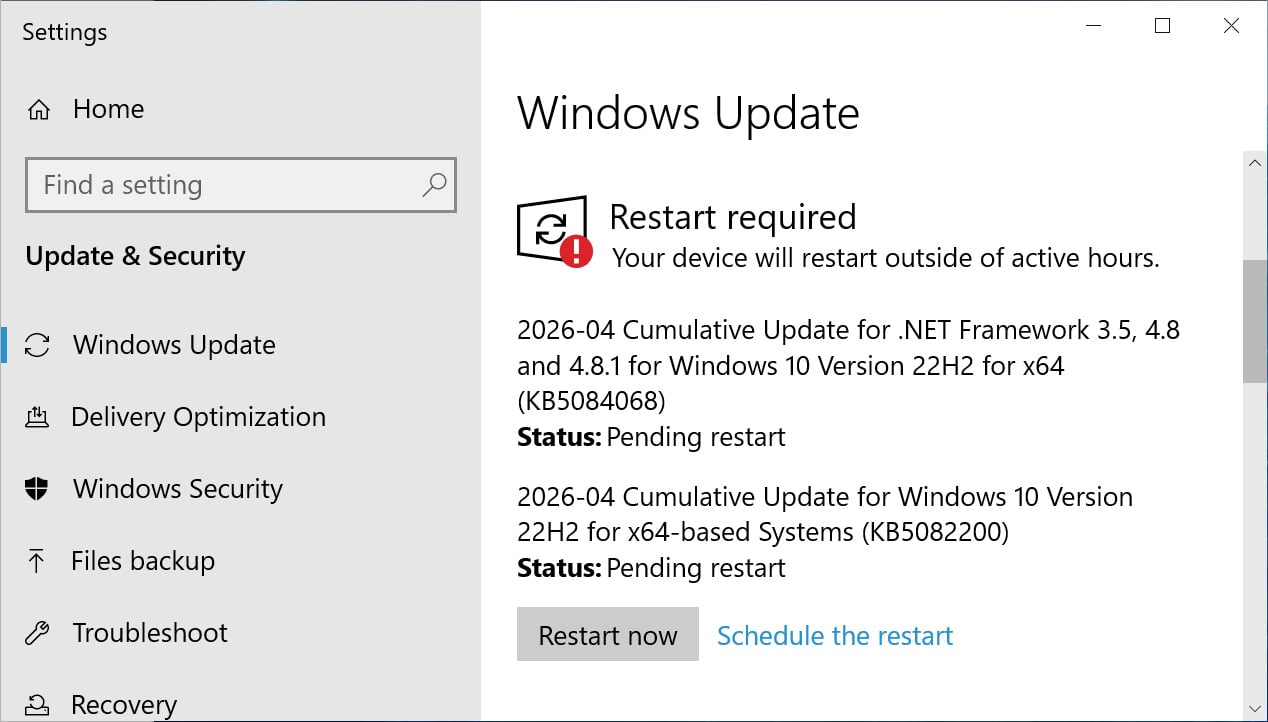
Microsoft has officially stated that there are no known issues with the KB5082200 update. This assurance is critical for enterprise environments, where the deployment of updates must be carefully managed to avoid introducing new instabilities or incompatibilities. The "no known issues" statement suggests that the update has undergone rigorous testing within Microsoft’s quality assurance processes, aiming to provide a seamless patching experience.
This approach reflects Microsoft’s ongoing commitment to providing reliable security updates for its ESU customers. While Windows 10’s core development has shifted towards maintenance, the consistent release of high-quality, issue-free security patches is paramount for organizations that have invested in the ESU program. The company continues to prioritize the protection of its users, understanding that a significant portion of the global computing landscape still relies on Windows 10 for mission-critical operations.
Broader Implications for Enterprise and Legacy Systems
The release of KB5082200 and the ongoing nature of the ESU program have significant implications for enterprise IT departments and the broader management of legacy systems. For many organizations, upgrading an entire fleet of devices to Windows 11 is a monumental task, often hampered by hardware compatibility, application dependencies, and budgetary constraints. The ESU program, therefore, serves as a crucial lifeline, allowing these entities to continue operating Windows 10 securely without immediate pressure to upgrade.
However, the ESU program is not a long-term solution but a temporary measure. Each year of ESU support typically incurs additional costs, which can become substantial over time. IT departments must carefully weigh the cost of ESU subscriptions against the costs and benefits of accelerating their migration to Windows 11. The continuous stream of critical updates, including those addressing zero-day vulnerabilities and proactive security enhancements like RDP phishing protections, highlights the persistent threat landscape that necessitates such vigilance. Organizations leveraging ESU must maintain robust patch management strategies, ensure timely deployment of these updates, and actively monitor their systems for any potential post-patch issues, despite Microsoft’s "no known issues" declaration.
The secure boot certificate rollout also emphasizes the ongoing need for lifecycle management of fundamental security components. As cryptographic standards evolve and older certificates expire, proactive updates are essential to maintain the integrity of the boot process, a foundational element of system security. The provision of monitoring tools within Windows Security empowers administrators with the visibility needed to manage this transition effectively.
In conclusion, the Windows 10 KB5082200 update is a comprehensive and critical security release for users within the Extended Security Update program and those running Windows 10 Enterprise LTSC. By addressing 167 vulnerabilities, including two zero-day exploits, and introducing key protective features like RDP phishing defenses and Secure Boot certificate monitoring, Microsoft continues to uphold its commitment to the security of its legacy operating system. This update serves as a reminder of the dynamic nature of cyber threats and the continuous effort required to maintain a secure digital environment, particularly for systems operating within extended support lifecycles. Organizations must prioritize the timely installation of this update to safeguard their infrastructure against the evolving landscape of cyber threats.

